
We have some lengthy Patch Notes today! In addition to the standard list of bug fixes and improvements at the end, we want to highlight and break down our first set of improvements for the Intermodal Terminal.
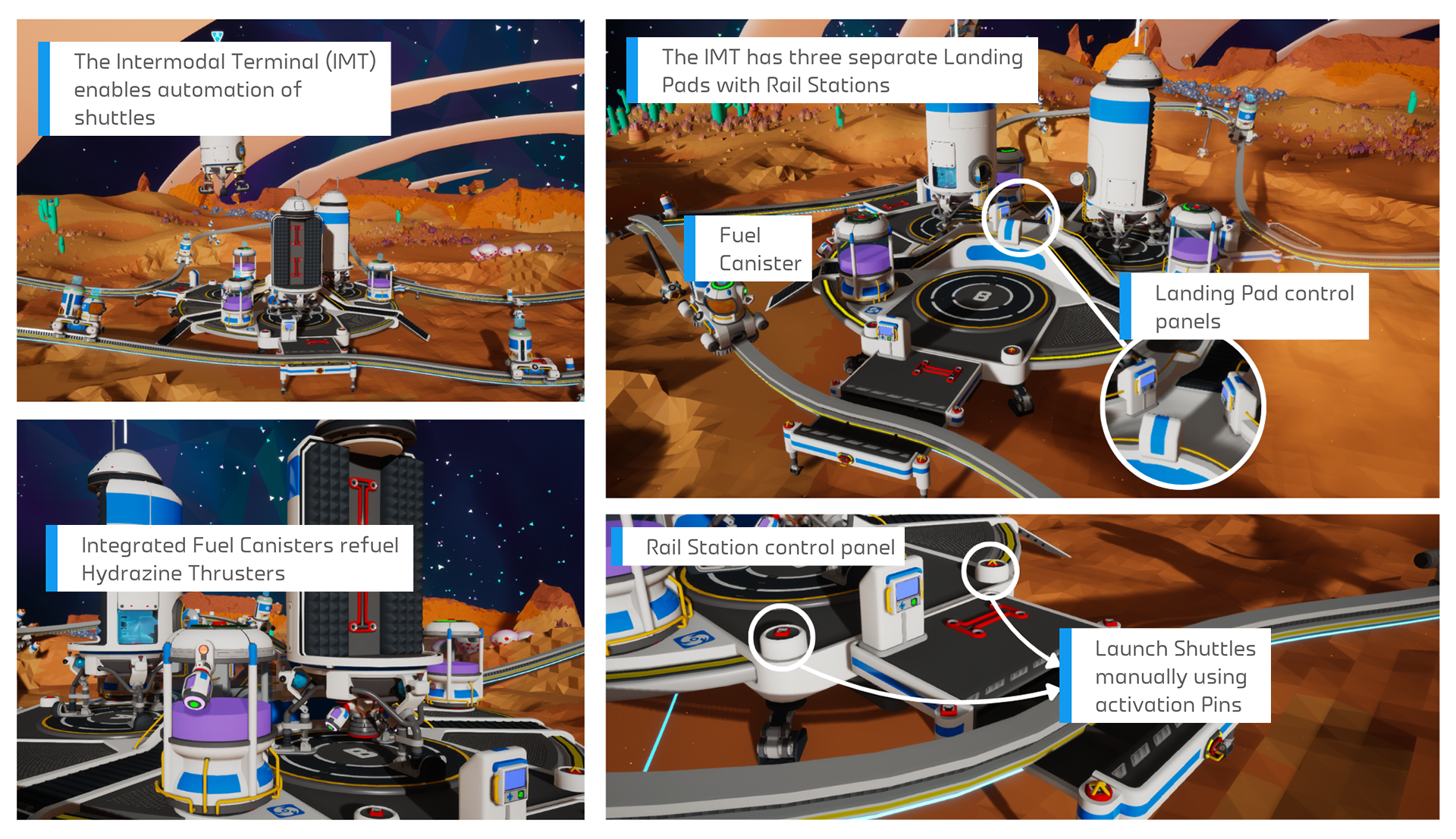
The in-game Intermodal Terminal Tutorial is a good reference point for identifying each of the components of this Megastructure.
FIRST SET OF IMT IMPROVEMENTS
We previously messaged that we would be making gradual improvements to the Intermodal Terminal (or IMT) over the course of multiple updates. This is the first of those updates, with substantial changes made to the IMT’s control panels and automated movement of items between slots, based on the feedback provided by the community.
Loading Modes
- The IMT’s Shuttle Loading Mode and Rail Station Loading Mode control panel settings have been unified. Changing one now automatically changes the other to its opposite setting.
Now, when the Shuttle Loading Mode is modified on the Landing Pad control panel, the Loading Mode on the Rail Station control panel is modified as well to the opposite state. This prevents the player from choosing independent settings that can result in conflicting loading modes, which could block item transfer actions.
We have also added a “Loading Disabled” mode to the Landing Pad control panel to bring the settings into sync.
IMT Rail Station Unsaved Settings
- Changing the settings on either the Landing Pad control panel or the Rail Station control panel now enters both into the Unsaved Settings state. If settings are saved on one control panel, they are saved on both.
With the unification of Loading Mode settings between the two IMT segment control panels, it has become possible to affect the state settings displayed on one control panel from the other. This means we had to bring the Landing Pad’s Unsaved Settings state to the Rail Station’s control panel.
Tier Filtering & Storage Transfers
- The item Tier filter setting for automation now counts items of the selected Tier and below.
- Fixed an issue that prevented the intended automated movement of storage items with slotted items of a lower Tier.
- Items will no longer be automatically moved off a Shuttle if they no longer match the Tier filter setting.
Previously, the Tier filter for the IMT Rail Station control panel only affected items of the exact matching tier. This also caused a bug which prevented smaller storage tiers slotted onto larger tiers from being transferred properly at all.
The bug affecting slotted storage items has been resolved, and the Tier filter has been changed to account for items of a lower tier. This should allow for more complex storage set ups to be transferable or be filtered at lower tiers.
Additionally, before this update, the item transfer rules could potentially move items off the receiving vehicle if the item did not match the set Tier Mode. Now, the IMT’s inter-vehicle item transfer rules will never move items from the receiving vehicle’s storage slots.
We also have a couple more bug fixes for the IMT listed in the Patch Notes section below.
BUG FIXES
Megastructures
Intermodal Terminal:
- Fixed an issue where the Landing Pad Activation Pins would not receive a signal when a Shuttle landed.
- Fixed an issue where players were allowed to set a Shuttle’s destination in the Landing Pad control panel as the same planet that the IMT is currently on.
- Dev Note: There are circumstances where setting the same planet as a destination would make sense when trying to use the Recall Shuttle function, but this could cause UI/UX issues with other functionalities. We have now improved the control panel status messaging around these scenarios so that it’s clearer when you are targeting a valid planet or not.
Orbital Platform:
- Fixed an issue which prevented client players in multiplayer games from being able to create or place Walkways on the Orbital Platform.
Biodome:
- Fixed an issue which caused Biodome Mega Modules to not play their audio SFX when picking them up, releasing them, or having them impact terrain or other objects.
Museum:
- Fixed an issue which caused collections on the Museum Display Case to stop being considered as complete if players removed a duplicate item of the collection from the Display Case.
- Fixed an issue which caused the Gold Milestone reward items to not play their audio SFX when picking them up, releasing them, or having them impact terrain or other objects.
Miscellaneous
- Fixed an issue where upon depletion of a Solid Fuel Thruster, if the Shuttle had additional Solid Fuel Thrusters in storage, a second Solid Fuel Thruster would become depleted.
- Dev Note: As a result of this bug fix, Shuttles will no longer attempt to replace consumed Thrusters in the Thruster slot with Thrusters from the Shuttle storage. Consumed Thrusters will remain on the Shuttle Thruster slot and must now be replaced manually by the player.
- Made improvements to significantly reduce the likelihood of an issue which caused Tappers to float in the air and become uninteractable after destroying the plant they were attached to.
- Dev Note: If you still encounter this issue after this patch, please contact our Support team: support@systemera.net
- Fixed a rare issue where new Vehicle Ports could spawn without any items attached.
- Partially fixed a rare issue where new Mega-X Platforms can spawn without any items attached.
- Dev Note: Large and Extra Large (Tier 3 and Tier 4) items will now spawn as intended, but Small and Medium (Tier 1 and Tier 2) items can still fail to spawn. We’ll continue working on making additional improvements to address this rare issue.
- Fixed a potential crash that could occur when players approached multiple Auto Extractors that were operating in close proximity.
- Fixed an issue which caused small Tier 1 items to slot in an incorrect place on the MEGA-Mini Shuttle.
- Fixed an issue which caused the hatch door and panel covering the Oxygenator on the Small and Medium Shuttles to be stuck open when launching into space.
- Lowered the limit on some Custom Game biome modifier values, as loading into saves beyond these limits could cause the game to crash.
- Fixed an issue which caused some text in several languages to be cut off when viewing the “Ready To Call Car” screen at a Rail Station.
- Fixed an issue which caused multiple base decoration items to not play their audio SFX when picking them up, releasing them, or having them impact terrain or other objects.
Legacy Issues
- Fixed a legacy issue which caused the Mysterious Mushrooms to only spawn in unexplored areas and despawn after closing and reloading a save.
- Fixed a legacy issue which caused the Train Whistle Emote to not play audio when used.
- Fixed a legacy issue that caused white icons to not appear on the green button of several control panels.
- Fixed an issue which caused vehicles to not give haptic feedback through the controller on PS5.
- Fixed an issue which would cause no audio to play through the controller when opening the Shelter/Landing Pad on PS5 at the beginning of the game.
- Fixed a crash that could occur when loading saves with Rail Cars that have formed a cyclic train where they mistakenly link to themselves.
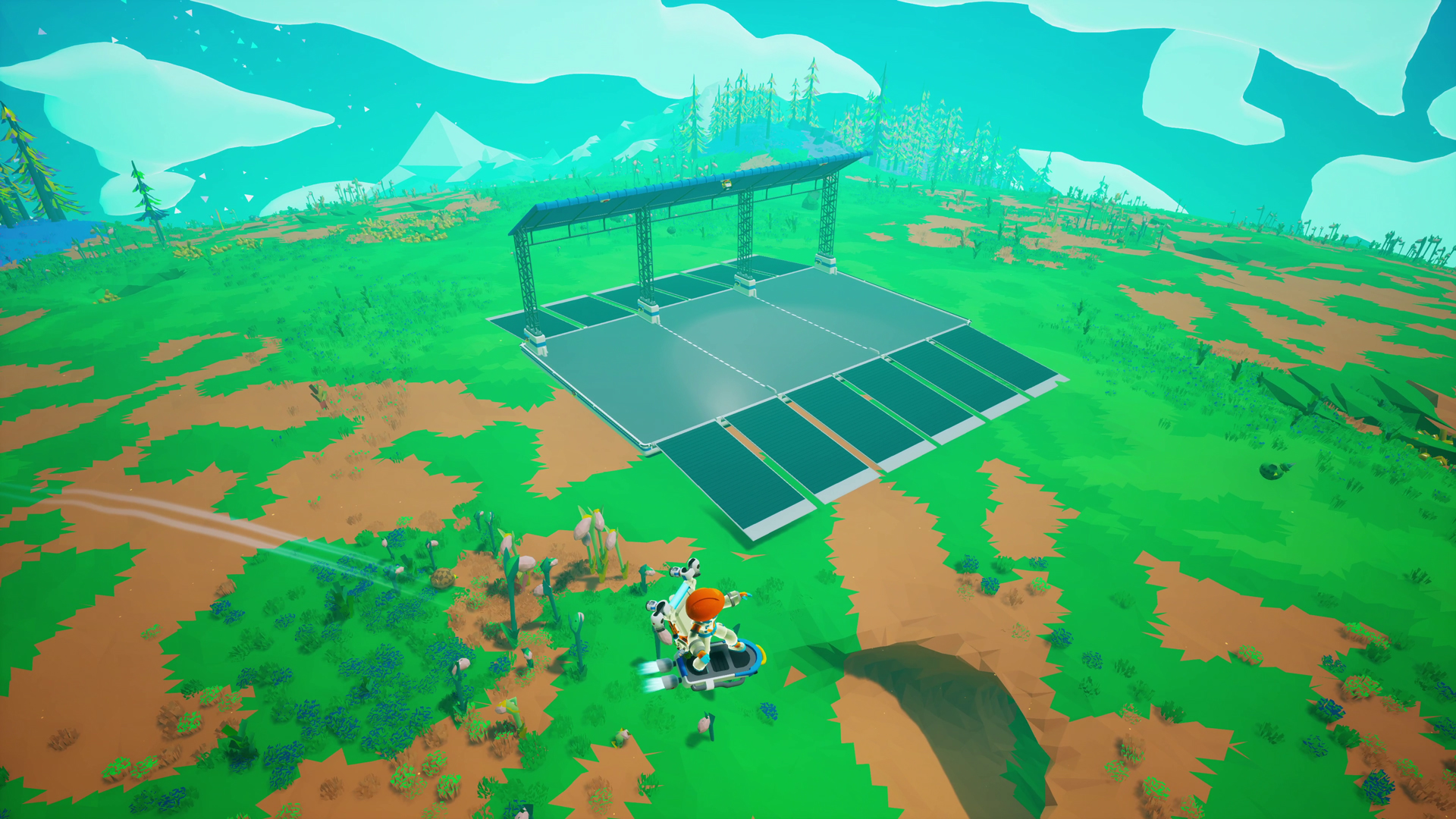
What is this? A Vehicle Port!
Renaming Miscellaneous Structures
Edit: We’re planning to update the names for the Vehicle Ports (previously Parkade Pad, where you find Data Circuits) and Mega-X Platforms (previously Installed Platform, where you find the Extra Large Resource Canister) in an upcoming patch. The current names aren’t very intuitive and don’t get mentioned often in-game, so we know players often ask about these. We’re trying to start using them to give an early heads up and Mission descriptions will soon use these new names too. We have a few fun ideas on what we’d like to do with these structures and hope to share more soon!
IMPROVEMENTS
- Added a new “Reclaim” action to Vehicle Ports and Mega-X Platforms. You can now reclaim up to 3 Data Circuits of the same type. Existing Data Circuits do not count towards this limit.
- Dev Note: This is meant to address Mission soft locks in rare cases where Data Circuits do not spawn on the structure.
- All Data Circuit Models are now unscrappable. To remove them from your world, you must now explode them with a Dynamite.
- Dev Note: This is to prevent an exploit that would allow generating infinite scraps by scrapping and reclaiming Data Circuits.
- Edit: Originally, we messaged that only Data Circuits A and B have been made unscrappable. As a correction, all Data Circuits have received this change for consistency.
- Mega-Printer Drones will now halt their printing if players are inside the hologram to prevent them from getting stuck.
- Made improvements to runtime memory usage on all platforms. Most notably, Nintendo Switch players should have more success saving larger worlds.
- Added a new Astropedia page with an overview of both free and paid Megastructures added to the game via the Megatech Update.
- Updated some UI and item icons such as icons for Creative Mode and Vehicles.
KNOWN ISSUES
Edit: The following issues have been identified following the release of this patch and will be addressed in an upcoming update. Check the Bug Tracker for more information.
- Some Vehicle Ports have an incorrect “Mega X-Platform” tooltip in save files that were created before Update 42.
- In multiplayer, Solid-Fuel Thrusters may not convert to Used Solid-Fuel Thrusters if they’re used by clients (non-hosts).
- Shuttles that are placed on the IMT will not have a prompt to launch even when removed from the IMT. You can resolve this by packaging and then unpackaging the Shuttle.
- On the IMT (specifically Pad B), if the player removes a storage unit from a Shuttle while the IMT is in Loading mode, the items on the storage unit will incorrectly transfer over to the Shuttle instead of moving off with the storage.
- The Loading Mode settings on Rail Station C of the IMT will revert when the settings are saved by the player.
We’ve also heard the feedback about the changes to Data Circuits and making them unscrappable, which is especially troublesome for Data Circuits earned from LTEs. We’ll be making tweaks in an upcoming update to address this, thank you for pointing these out!

We look forward to hearing your feedback on the latest changes! Keep an eye on our Live Bug Tracker to check the status on other bugs present in the game, and if you run into an issue that isn’t listed or you have more information to share, please send us a bug report.
– Honourael
More Astroneer Content in These Places